Why an S3 client still matters in 2026
Object storage stopped being "just AWS" a long time ago. Between AWS S3, Cloudflare R2, MinIO, Backblaze B2, and DigitalOcean Spaces, most teams now have buckets scattered across two or three providers — usually one for production assets, one for backups, and a self-hosted MinIO instance for local dev or on-prem compliance. The AWS Console only speaks S3. aws s3 and rclone work, but neither gives you a place to look at what's actually in a bucket, preview an image, or fix an ACL without reading flag documentation first.
A dedicated S3 client fixes that: one native app, one login flow, every S3-compatible bucket you touch.
What to look for in an S3-compatible storage browser
- Multi-provider support — S3, R2, MinIO, B2, and Spaces all implement the S3 API slightly differently around multipart thresholds, region handling, and path- vs. virtual-hosted-style URLs. A client built against "S3" alone tends to break the moment you point it at R2 or a self-hosted MinIO endpoint.
- Multipart upload and download with resumability — moving a 20 GB file over a flaky connection without automatic retry and progress tracking is how you lose an afternoon.
- Presigned URLs on demand — sharing a private object without making the whole bucket public shouldn't require a script.
- ACL and metadata inspection — knowing whether an object is actually public, and to whom, before it ships.
- In-app previews — images, text, and JSON, without a round trip through a browser tab.
- A single workspace for storage and databases — most teams debugging a production issue need both the bucket and the database in the same session, not two separate tools.
rdSQL Desktop as an S3 client
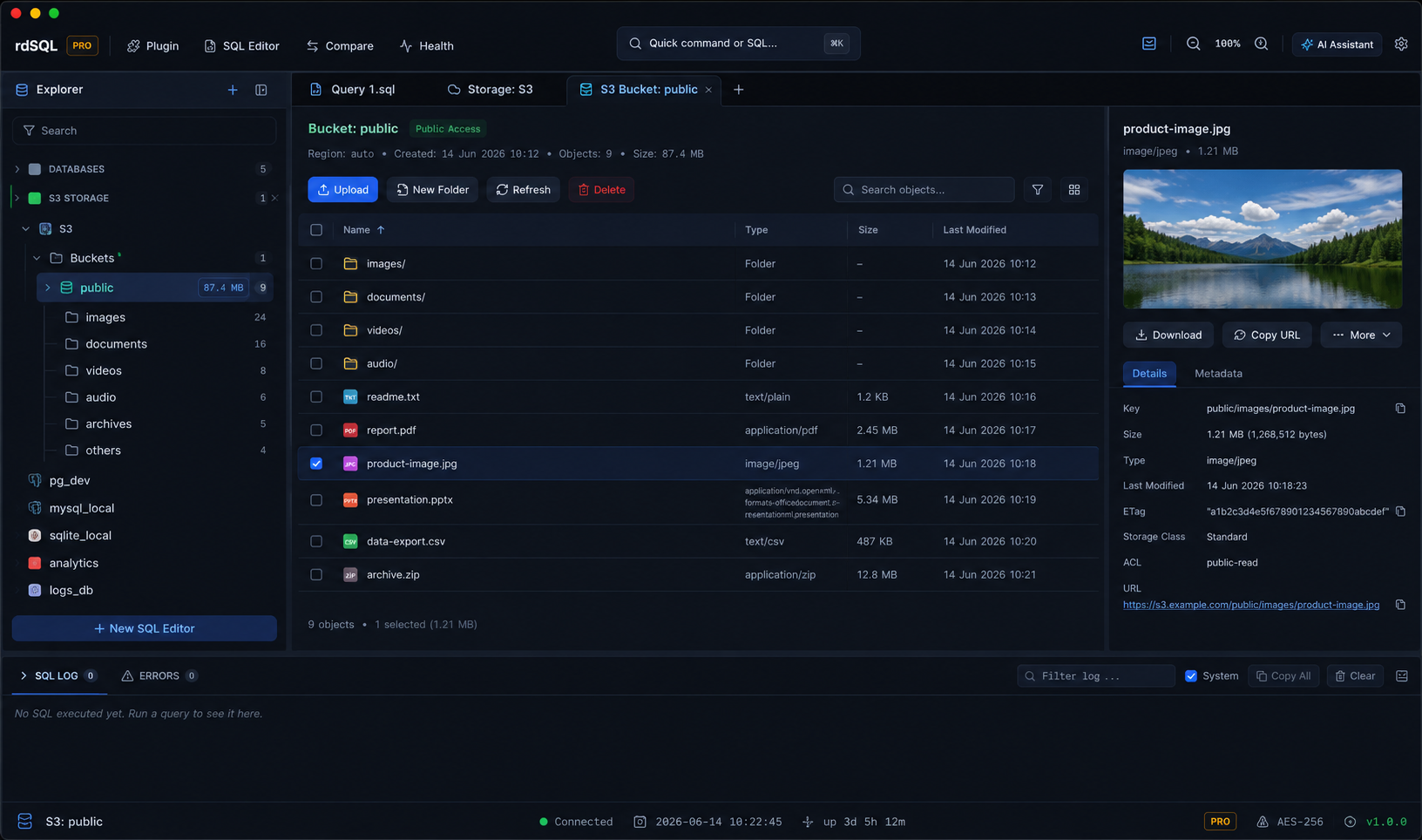
rdSQL Desktop ships a native object storage browser alongside its SQL and NoSQL clients, covering AWS S3, Cloudflare R2, MinIO, Backblaze B2, and DigitalOcean Spaces from one connection manager. See the S3, R2 & MinIO client page for the full feature breakdown, but the short version:
- Multipart upload & download with real-time progress, smoothed transfer speed, ETA, cancellation, and batch operations — bounded concurrency with automatic retry, so a dropped connection on file 40 of 200 doesn't take the other 199 down with it.
- Presigned URLs & ACL editing generated and inspected in a couple of clicks, plus in-app previews for images, text, and JSON.
- One workspace for buckets and databases — switch between your S3-compatible storage and a PostgreSQL, MySQL, MongoDB, or any other supported connection without leaving the app, with the same schema-aware AI assistant available in both.
Because it's a native desktop app (not Electron), it stays fast and light even when you're browsing a bucket with millions of keys.
S3 client comparison at a glance
| rdSQL Desktop | AWS Console | CLI (aws s3 / rclone) | |
|---|---|---|---|
| Multi-provider (S3, R2, MinIO, B2, Spaces) | Yes | AWS only | Yes, with per-provider config |
| Native GUI with previews | Yes | Browser-based | No |
| Presigned URL generation | In-app, one click | Manual, per-object | Scripted |
| Same app for databases | Yes | No | No |
| Setup | Add a connection | None (AWS-hosted) | Config files per provider |
FAQ
Does rdSQL Desktop work with Cloudflare R2 and MinIO, or only AWS S3? It connects to any S3-compatible endpoint — AWS S3, Cloudflare R2, MinIO (self-hosted or managed), Backblaze B2, and DigitalOcean Spaces — using the same connection flow.
Can I browse buckets and query a database in the same app? Yes. Storage connections and database connections live in the same Explorer, so you can switch between an S3 bucket and a PostgreSQL or MongoDB connection without switching apps.
Is there a free tier? See Download for current platform builds and pricing.
Ready to try it? Download rdSQL Desktop for macOS, Windows, or Linux.