Redis Key-Value Browser
Every logical database, every data type, one browser.
Free • macOS, Windows & Linux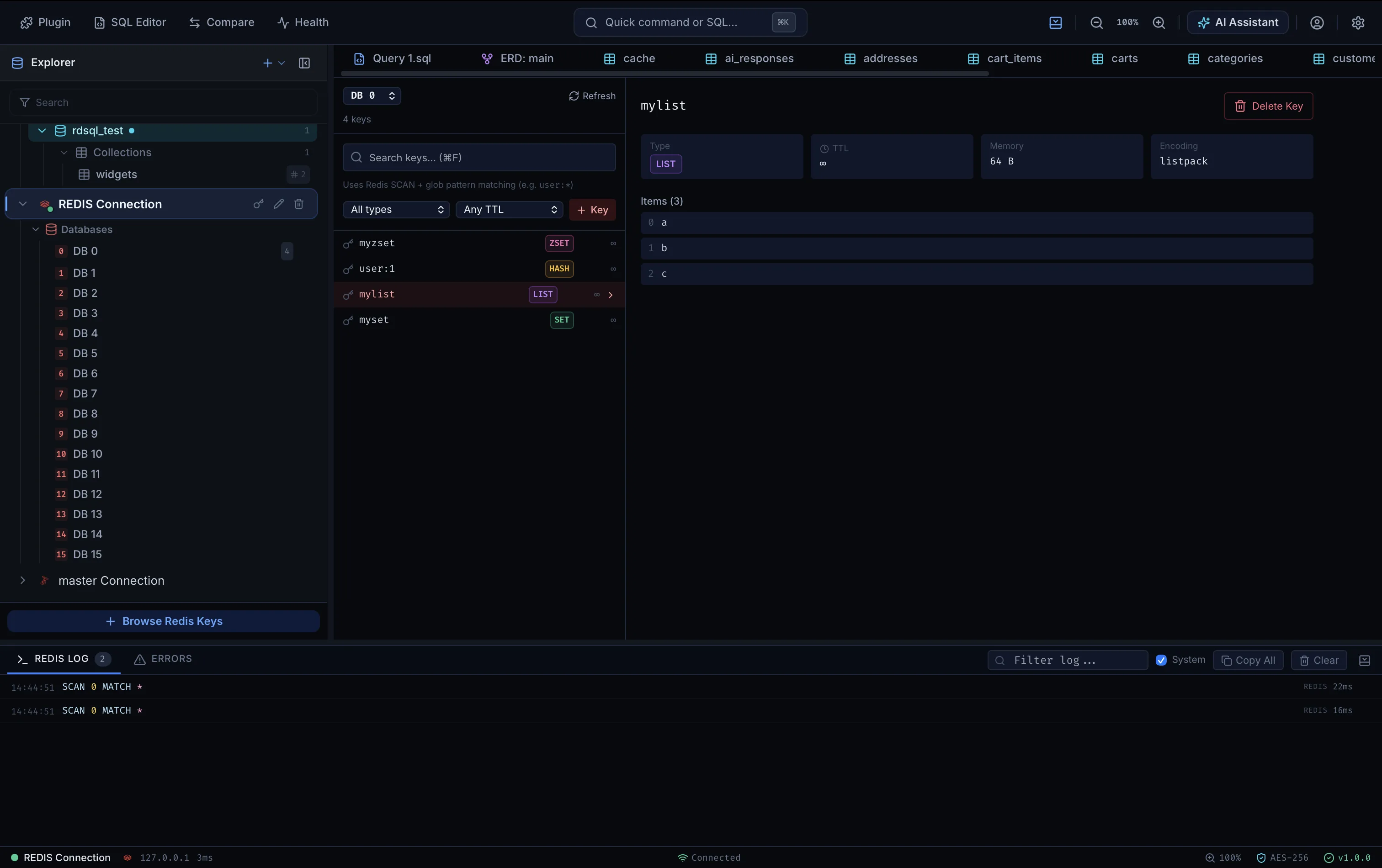
rdSQL Desktop browses Redis keyspaces directly — scan keys across all 16 logical databases, inspect TTL and memory usage, and edit values inline, right next to your SQL and MongoDB connections.
SCAN-Based Key Browser
Browse every logical database (DB 0–15) and search keys with glob pattern matching over Redis SCAN — safe on large keyspaces, with type and TTL filters built in.
Full Data-Type Support
Inspect and edit STRING, HASH, LIST, SET, and ZSET values inline, with per-key TTL, memory footprint, and encoding shown alongside the data.
In-App Command Log
Every command rdSQL sends to Redis is logged in a dedicated panel — SCAN cursors, timings, and errors — so you can see exactly what ran and how long it took.
Zero Telemetry by Default
Credentials, query logs, and record sets never touch any cloud server unless you opt in to encrypted sync.
Native Rust Performance
A native async driver pool built for low-latency queries — not an Electron wrapper.
One Workspace, Every Feature
Redis Key-Value Browser sits right next to every other tool in the same app — no switching windows.